
How to build your own real-time assistant for important conversations
Artorix is an assistant that listens to a meeting together with me: before the conversation I load a plan, and during it Artorix shows whether we are on plan, what hasn’t been asked yet and what to ask next. I control it from an external MIDI controller: pads let me tag the conversation silently, and knobs and faders change the processing parameters live, during the meeting.
- Status
- Research, my working tool
- Access
- The source code on request, a pilot on request. Once Artorix is out for others, the link goes here
- Guide
- 23 September 2026
- Stack
- Python, FastAPI, Soniox, Claude
- Reading
- 15 min
What this guide is
This is how Artorix works, what the measurements on real meetings showed and how to build an assistant like it yourself. The guide describes the approach and the lessons, not the source code; I share the code in person if you are really interested.
For me Artorix is not a product but a working tool: I run interviews and negotiations with it. It remembers the conversation; the people live in CoFlow, my personal system. Artorix and CoFlow are the current versions of tools I have built and rebuilt many times.
Research Once Artorix is out for others, the link will be here.
- ×17spread of hourly cost between the extreme positions of the Pace fader
- $0.71per meeting hour in the normal mode
- 16pads: four layers of silent tagging
- 2audio tracks: the microphone is me, the computer output is the other person
The idea
There are more tasks in a conversation than attention.
When you run an interview or a negotiation, you have to listen, think about the next question, keep the plan in your head and read the other person’s state, all at once, and then review it all afterwards. People do this badly not for lack of skill: there are more tasks than attention.
Artorix’s bet: a conversation is data, and part of the work on it can be taken off the person at the moment when it can still change something. Not “a transcript afterwards” but a prompt inside the meeting. Three rules follow from that and shaped the whole design:
- real time matters more than precision;
- silent tagging matters more than convenient tagging: you can’t type during a conversation, the other person sees it, so buttons instead of a keyboard;
- any feature that pulls your attention away from the other person is harmful, even if it is useful.
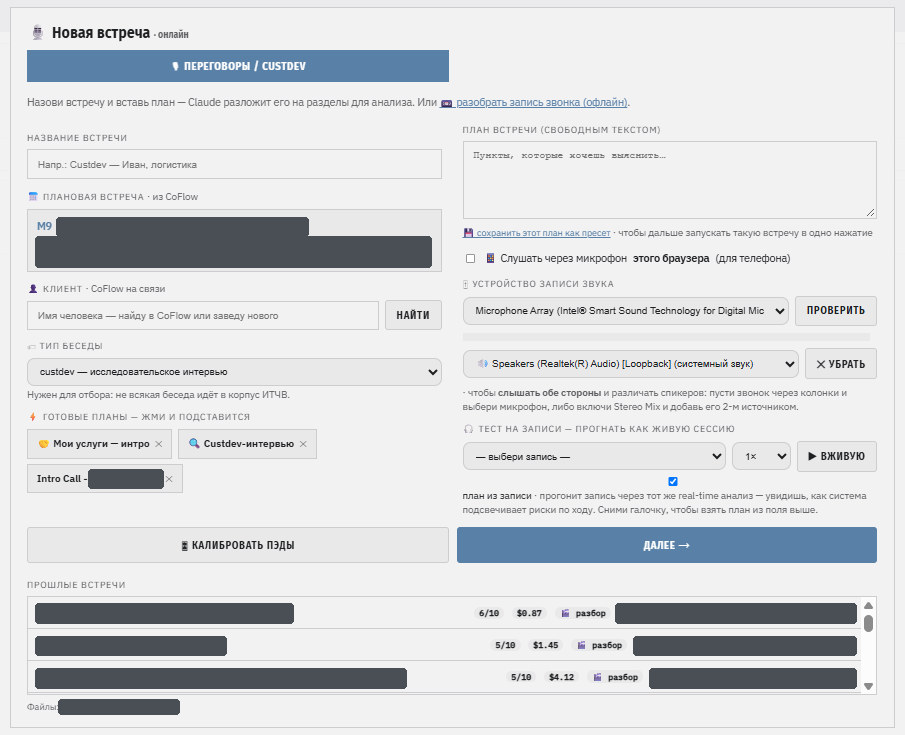
Use cases: negotiations, customer-development interviews, podcast recordings. The plan is pasted as free text; the model breaks it into sections and questions itself. Demanding that someone fill in a form before a meeting is a sure way to make sure the system never gets used.
How it works
Two audio tracks, real-time transcription, analysis in ticks.
Audio comes in on two tracks and is transcribed in the cloud in real time. The model analyses the conversation in “ticks”: every N seconds, or when a pad is pressed.
The diagram scrolls sideways.
| Part | What it does | Why this way |
|---|---|---|
| Audio capture | Microphone = the host; output capture (WASAPI loopback) = the other person on the call. 16 kHz, mono, 100 ms blocks | The other person arrives on the output device, not in the microphone |
| Who is speaking | An energy map in 20 ms frames answers “who spoke in this interval” with arithmetic, no model | Physics knows the role exactly: the microphone is me |
| Transcription | Soniox, real time over WebSocket; recordings via a separate asynchronous pass | Russian and English mixed in one conversation; streaming mode fails on long files |
| Analysis tick | The model gets the plan, the conversation “thread” and the latest chunk of dialogue; it returns on plan or drifting, closed questions, one to three next questions, key quotes, talk balance | Live analysis on a cheap model, the final review on an expensive one, once or twice per meeting |
| One clock | Every layer (transcript, tags, analyses) records time from the start of audio | Otherwise a pad tag doesn’t land on the right line |
| Screen | Plan with checklist → transcript with tags → analysis. All of it is a function of the event stream | The stream is saved, so a meeting can be replayed as a “mini-film” |
| Bridge to CoFlow | At the start it finds the person and opens a session; at the end it writes the outcome. Zero calls during the meeting | An unavailable personal database must never cost a meeting |
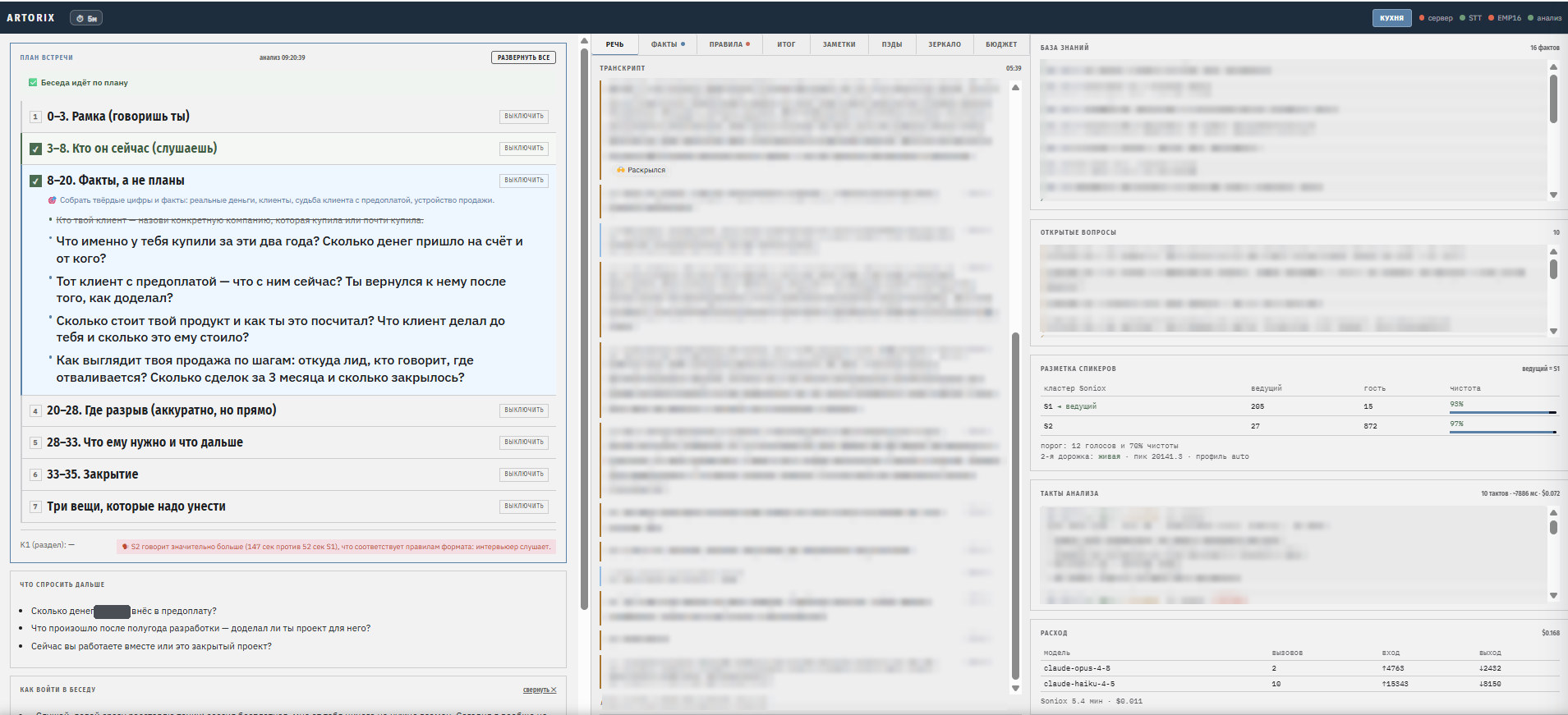
Stack: Python + FastAPI, everything local on a Windows laptop; the only external services are Soniox (transcription) and Anthropic (analysis). There is also an offline mode: upload a recording and a plan and get a timeline with on-plan stretches in green and deviations in red.
The external MIDI controller
Buttons instead of a keyboard: tagging the other person does not see.
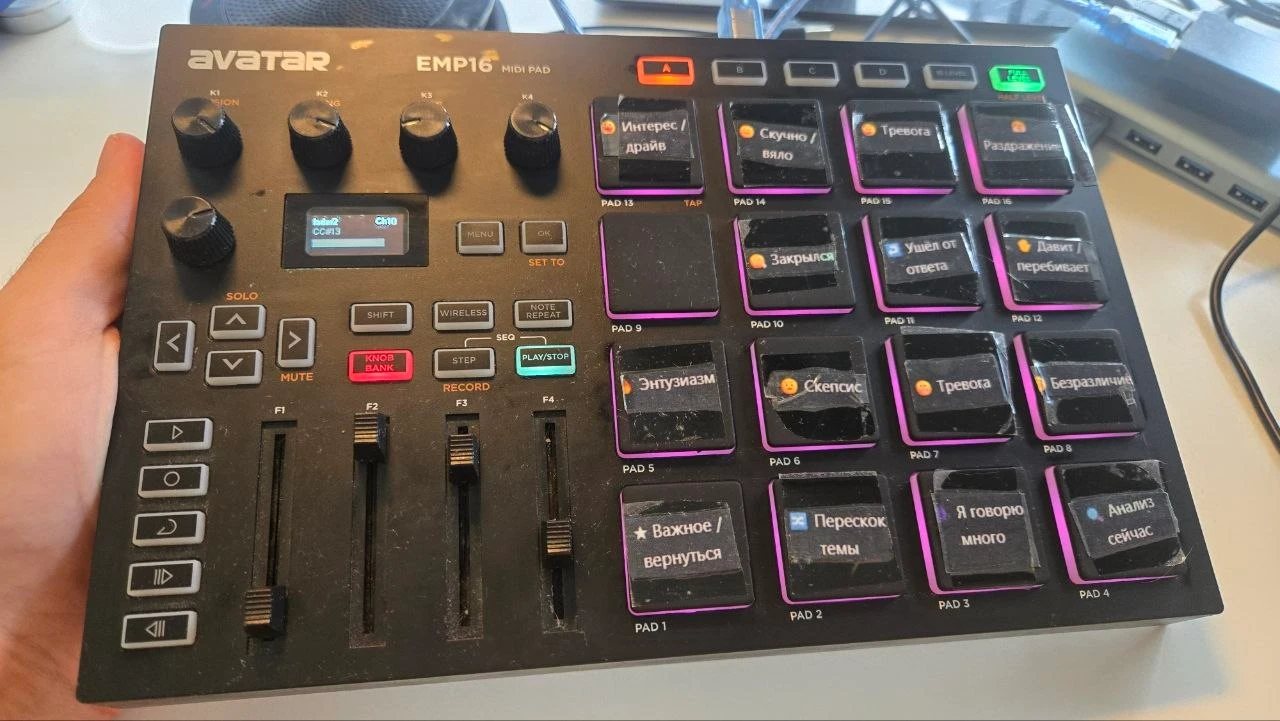
Control lives on an ordinary music pad console, the HXW / Avatar EMP16: 16 velocity-sensitive pads in a 4×4 grid, 4 endless knobs, 4 faders, an OLED screen, USB or Bluetooth (specs). You can hit a pad or move a fader without looking away from the other person and without keyboard noise: that is the whole reason it’s there.
The diagram scrolls sideways.
Pads: four layers of tagging, one row per layer. What I felt; how the other person behaved; what I think they felt; what is happening with the meeting. Each press lands as a tag on the timeline at that exact moment. The “Analyze now” pad triggers an out-of-turn analysis.
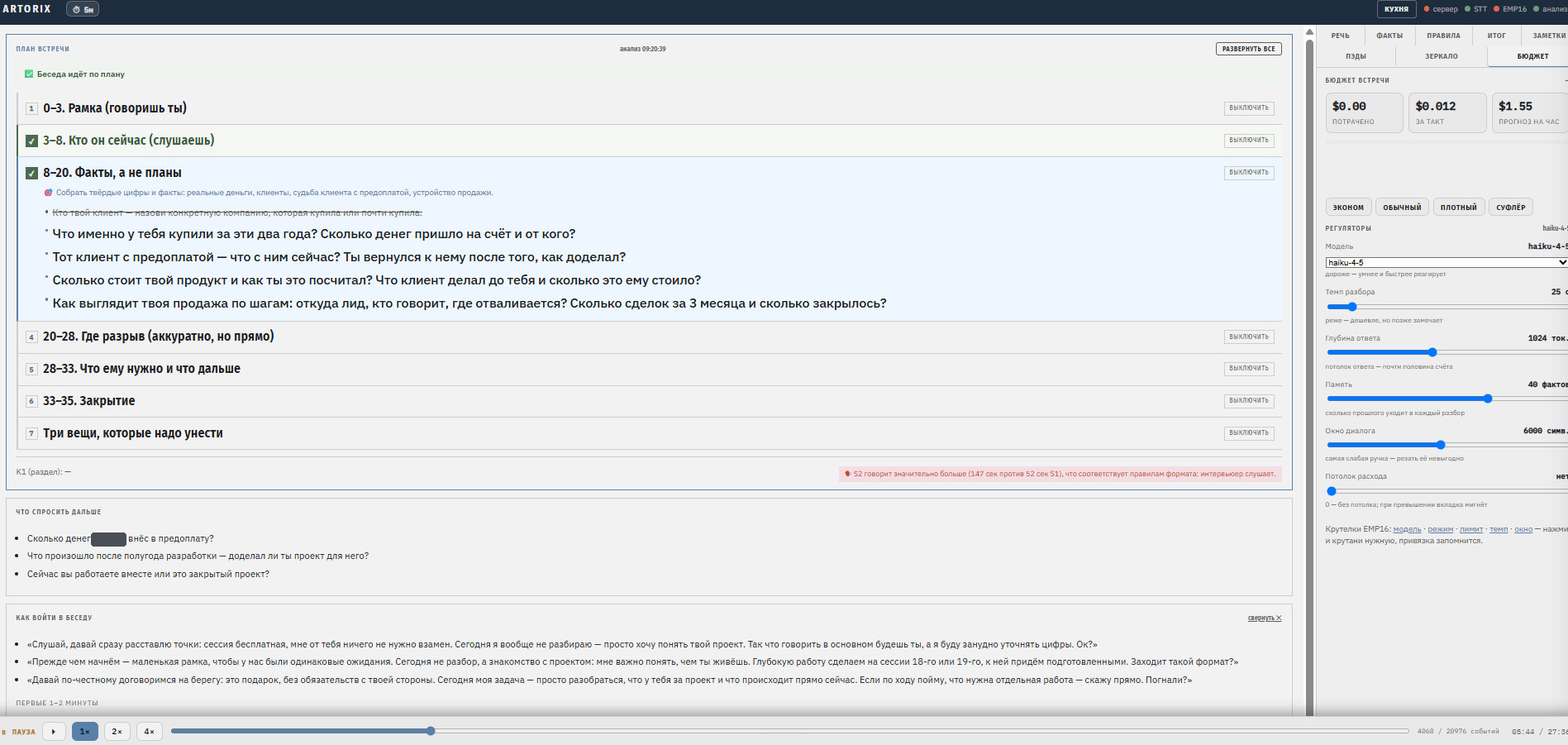
Knobs and faders: processing parameters. Knobs select discrete things: model, preset mode, spending cap. Faders smoothly change four values, covered in the next section. The analyser reads them on every tick, so a turn takes effect from the next analysis, not from the next meeting.
Two practical points
- Binding by learning. Every unit sends its own MIDI numbers, and you can’t know them in advance. You pick a role on screen, turn the knob you want, and the binding is saved. Pads are calibrated the same way, with the first press.
- The controller runs in a separate process. If it disconnects or crashes, you lose tags, not the meeting recording (see “What to watch out for”). The system also works without the controller: the same pads and knobs are on screen, but then you have to look at the monitor.
Processing parameters and what changing them gives you
The cost of a meeting is driven by how often the model analyses, not by the window.
The main finding: the cost of a meeting is driven by how often the model analyses, not by the size of the dialogue window. This goes against intuition: it feels like “sending lots of text” is what’s expensive. But text is cheap, while every extra model call drags along the system prompt, the answer and overhead.
What you change on the fly
The order of impact was confirmed by measurements on real meetings. Hourly cost is shown as a guide: what matters is not the numbers themselves but the spread between a knob’s extreme positions.
| Control | What it sets | Values | Cost per hour, $ | Spread |
|---|---|---|---|---|
| F1 · Pace | pause between analyses | 10 / 25 / 90 / 180 s | 3.84 / 1.54 / 0.43 / 0.22 | ×17 |
| Knob · Model | which model analyses | Haiku / Sonnet / Opus | 1.54 / 3.09 / 7.71 | ×5 |
| F2 · Depth | cap on the model’s answer | 256 / 1,024 / 2,048 tokens | 1.08 / 1.54 / 2.17 | ×2 |
| F4 · Memory | how much of the conversation “thread” goes into the prompt | 0 / 8,000 / 16,000 chars | 1.06 / 1.54 / 2.03 | ×2 |
| F3 · Window | how much fresh dialogue per analysis | 800 / 1,500 / 12,000 chars | 1.47 / 1.54 / 2.70 | ×1.8 |
The controls sit on the panel in this order, by strength of impact. In a conversation it works like this: an important stretch starts, I raise the pace; small talk starts, I lower it. A text field is useless for this, while a fader is the same gesture as tagging with a pad. When a control moves, the forecast on screen updates instantly: you see the cost of a decision before you make it.
Preset modes
A preset sets all controls at once; after that you can move them by hand.
| Mode | Model | Pause, s | Per meeting hour, $ | 14 meeting hours a month, $ |
|---|---|---|---|---|
| Economy | Haiku | 90 | 0.23 | 3 |
| Normal (default) | Haiku | 45 | 0.71 | 10 |
| Dense | Haiku | 15 | 2.84 | 40 |
| Prompter | Sonnet | 15 | 5.68 | 80 |
| Maximum | Sonnet | 10 | 15.72 | 220 |
Three non-obvious things the measurements showed
- The answer cap is the main valve. The model writes “as much as allowed”, not “as much as needed”: in a long meeting most analyses hit the cap, and the answer becomes the most expensive line in the bill. Lower the cap until the analyses get poorer; test it by running the same recording on two settings.
- Memory makes every next analysis more expensive. Facts and open questions accumulate, and by the end of a meeting one tick costs several times more than at the start. Trim it with a window of recent facts, not an on/off switch: memory is what makes the analysis smarter.
- Russian text costs roughly three times more than English: it splits into tokens less efficiently. That’s why back-of-the-envelope estimates always come out more optimistic than the bill.
Audio buffers and windows
Numbers that had to be tuned on live meetings.
No controls needed here, but these numbers had to be tuned on live meetings.
| Parameter | Value | Why |
|---|---|---|
| Audio block | 100 ms at 16 kHz | The microphone sets the tick; the other person’s track goes silent in silence, and its gaps are padded with zeros in a ring buffer |
| Energy frame | 20 ms | Enough to tell by arithmetic who was speaking |
| Freshness window for the second track | 90 s | If the other person hasn’t been heard near a line, physics doesn’t judge the role |
| Role vote | once per meeting | The “me / other person” role isn’t revised on the fly, otherwise lines get torn apart |
| Session limit | 90 min, then “continue?” | A forgotten session records and transcribes everything said around you |
Measurement rule: don’t judge cost from runs shorter than 15 minutes. On a short test a noticeable part of the bill goes to writing the prompt cache, which doesn’t have time to pay off, and the hourly cost comes out twice too high.
What to watch out for
A failure of one part must not cost the meeting.
The main rule: a failure of one part must not cost the meeting. The controller, the second track, the analysis, the database link: any of them may fail, but the recording must finish.
- A silent failure is worse than a loud one. The worst breakdowns look like normal operation on screen. The system must distinguish “wait” (service overloaded) from “go fix it” (out of credit, wrong key) and say so loudly.
- The controller runs in a separate process that dies together with the server. MIDI drivers on Windows can crash the whole process in a way you can’t catch. And only one process can hold a MIDI input: a forgotten old listener will grab the controller. If the device “isn’t visible”, check the cable first.
- The other person arrives on the output, not in the microphone. Capture the output of any device, including Bluetooth headsets, and keep the two tracks separate.
- A track can die mid-meeting. The other person moves from the call into the room, and all speech starts being attributed to you. No fresh audio on the track, no judgment about the role.
- Don’t mix two speaker labelings word by word. The transcription service cuts the lines, and the track physics decides once which voice is you. Token-by-token substitution tears monologues to shreds.
- The model’s answer is data, not a guarantee. It sometimes returns a list as a string. Normalize everything external to the expected types at the boundary, or the assistant goes silent until the end of the meeting.
- Give the model memory, not the tail of the transcript. Without accumulated facts and questions it re-asks what has already been said. Memory plus only the new chunk of dialogue: both cheaper and smarter.
- Nothing periodic next to the recording. Polling devices on a timer is a road to a crash. Check only when there is a reason, with an increasing pause.
- Cost is part of the interface. The spend counter and forecast are always on screen. An unaccounted cost line means “expensive or not” is decided on the wrong number.
- Show what goes into the model. A diagnostic panel (“this tick, on these words, produced this output and cost this much”) lets you spot a breakdown during the meeting, not after.
- The screen is a function of the event stream. Then replaying a meeting comes for free and never diverges from what you saw live.
- Don’t invent numbers or people. If the database is unavailable, the meeting is recorded under a temporary name and linked later. An ambiguous participant is chosen by a human, not the system.
Expected vs observed results
Where quality breaks and where the cost comes from.
The biggest gap between expectation and reality is where quality breaks and where the cost comes from.
| What | Expected | Observed |
|---|---|---|
| Help in the moment | A prompter every negotiator needs | It helps me keep to the plan and not lose open questions. But some executives want preparation before and a review after, not prompts during. Real time isn’t for everyone |
| Cost | Expensive because of speech recognition | Transcription is a small share of the bill; the rest is the language model. A cheap model for live analysis cuts the bill several times, but growing memory later pulls it back up. With the controls, cost became a managed value |
| Own hardware | Local models will save money | At personal volume it never pays off, and hardware doesn’t buy better speaker labeling |
| Transcript quality | Recognition breaks | Recognition gave correct labeling; our own arithmetic on top of it broke it |
| Processing controls | Sending a large dialogue window is expensive | The window is the weakest control and the most harmful to save on: cut it and you lose coherence. Pace is what matters |
| Pad tags | A tag immediately affects the analysis | Tags land precisely on the timeline and are visible on replay. Getting a tag through to the model, and to the exact phrase inside a long line, is a separate task |
| Screen during the meeting | A quick glance | Heavier than I’d like: any window that covers the transcript gets in the way exactly when you need to look |
| Profile of the other person | The system remembers the person | Artorix remembers the conversation, not the person. The person lives in CoFlow: the brief comes from there and the outcome goes back there |
How to build it yourself
Seven steps, from reviewing a recording to a link with a people memory.
Minimum kit: a Windows laptop, Python 3.11+, API keys for a speech recognition service and a language model, any MIDI controller with pads and faders (you can skip it at first).
- Start offline. Call recording + plan → transcript → review of “where we followed the plan, where we drifted”. This shows whether you need help at all before you deal with real time.
- Capture two tracks separately. The microphone is you, the computer output is the other person. Don’t mix to mono: you’d force the model to guess what is physically known for certain.
- Add live analysis with memory. On every tick: the plan, accumulated facts and only the new chunk of dialogue; the answer strictly follows a schema. Validate answer types at the boundary: the model sometimes returns the wrong thing.
- Keep parameters in session state, not in a config file. Pace, depth, window, memory and model are read on every tick. Add a cost panel right away: spent so far, cost per tick, forecast per hour. Without it the controls are turned blind.
- Connect the MIDI controller in a separate process. Pads are tags, faders are parameters; binding by learning. The controller process must die together with the server.
- Record the event stream, not just the text. Then any meeting can be replayed exactly as the host saw it, and the same recording can be run on two control settings.
- Link to a people memory, non-critically. Mine is CoFlow: calls only at the start and the end, and if the database is unavailable the meeting still runs and is recorded locally.
And above all: record other people only with their consent.
If you are really interested, I can share the source code: a version you can start building your own from. Write to me and tell me which meetings you want such an assistant for.
About the author and what I do with these tools
For me Artorix is a working tool, not a product.
I’m Pavel Mihutski, RND.energy, Valencia. For 20 years I’ve been building and rebuilding businesses; now I research how people make decisions. I have been analysing communication and building ERP and CRM systems since 2010. Artorix and CoFlow are the current versions of tools I have built and rebuilt many times. 9 industries, 130+ projects.
For me Artorix is not a product but a working tool. I use it for interviews and negotiations inside the Founder Sprint: ten working days with a founder on one main question. Where money is being lost, why everything depends on them, what will break as the company grows. From the company’s real data, including conversations with the team and call recordings, I build an honest picture of what is actually happening and where to go next. You get a grounded answer, an action plan with owners and a way to check the result.
If you want an assistant like this but don’t want to build it yourself, setting it up for your meetings is separate paid work.
How the Founder Sprint works. A first 20-minute conversation: via rnd.energy, LinkedIn or Telegram.
Terms
The guide describes the approach, not the code.
© Pavel Mihutski · RND.energy. This guide is for personal use: it describes the approach and the lessons, not the source code. Republishing, passing it on to third parties or commercial use only with the author’s written consent. The source code is not public: I share a version in person, on request.
Want the source code, or an assistant like this for your meetings?
If you want to build your own, I will share a version of the source code. If you want me to set the assistant up for your meetings, that is separate work. Tell me which you prefer and for which meetings. I reply personally.
Saved. I have your message.
I will reply personally, usually with a couple of questions about how you see your part. Terms are discussed in the conversation, not in the form.
Request reference: